
Platform Feature

Role-Based Access Controls

Control who sees what with granular permissions. Give team members exactly the access they need for their job, nothing more.

Right Access for Each Role

Not everyone needs to see everything. Your marketing team might update the knowledge base, but shouldn't change AI behavior. Your receptionist might review call logs, but shouldn't modify call routing. Your IT admin needs full access.

PhoneFlow's role-based access controls let you define exactly what each team member can do. Meet compliance requirements, reduce risk, and keep things organized.
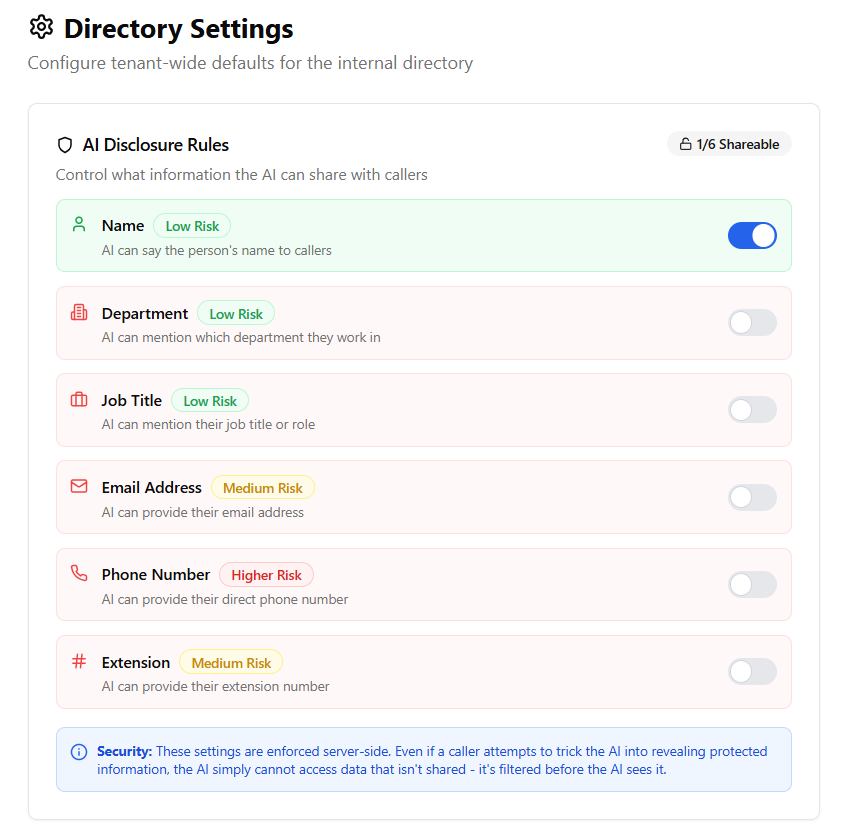
Staff Directory Access Control Settings

Control what information AI can share about each team member

Built-In User Roles

Common roles ready to assign, or create custom ones

📚

Knowledge Base Admin

Update what the AI knows without changing how it behaves.

  • Add, edit, delete knowledge base entries
  • Upload documents and FAQs
  • Review knowledge gaps from calls
  • Cannot change AI personality or routing
  • Cannot access call recordings
🤖

AI Manager

Full control over AI configuration and behavior.

  • Modify AI personality and voice
  • Edit call routing workflows
  • Configure integrations
  • Update knowledge base
  • Review call logs and analytics
📞

Call Log Viewer

Review calls and performance without making changes.

  • View call transcripts and summaries
  • Listen to call recordings
  • Access call analytics
  • Export call data
  • Cannot modify any settings
👑

Account Administrator

Full access including user management and billing.

  • All AI Manager permissions
  • Manage user accounts and roles
  • Access billing and invoices
  • Configure security settings
  • View audit logs

Why Access Controls Matter

  • Security: Limit exposure of sensitive call data to those who need it
  • Compliance: Meet regulatory requirements for data access controls
  • Stability: Prevent accidental changes to critical AI configuration
  • Accountability: Know who changed what with audit logs
  • Delegation: Let team members help without risking mistakes

Common Use Cases

  • Marketing team: Knowledge Base Admin role to keep FAQs current
  • Office manager: Call Log Viewer to monitor performance
  • IT/Operations: AI Manager for technical configuration
  • Business owner: Account Administrator for full oversight
  • Seasonal staff: Limited read-only access during busy periods

Audit Trail

Every action is logged. When someone updates the knowledge base, modifies call routing, or accesses call recordings, the system records who, what, and when. Essential for troubleshooting, compliance, and accountability.

Need Custom Roles?

We can configure access controls specific to your organization's structure and compliance needs.

Book Your Assessment